ALL-IN-ONE SIDELINE SYSTEM

DWNwire Football for iOS · Invitation-only beta

See the play.
Make the call.

Live video, rolling replay, saved clips, chat and voice—together in one sideline system. DWNwire Football is currently being used by school programs through invitation-only beta testing.

Feedback from participating coaching staffs is helping shape the public release.

THE OPERATOR WORKSPACEFootball
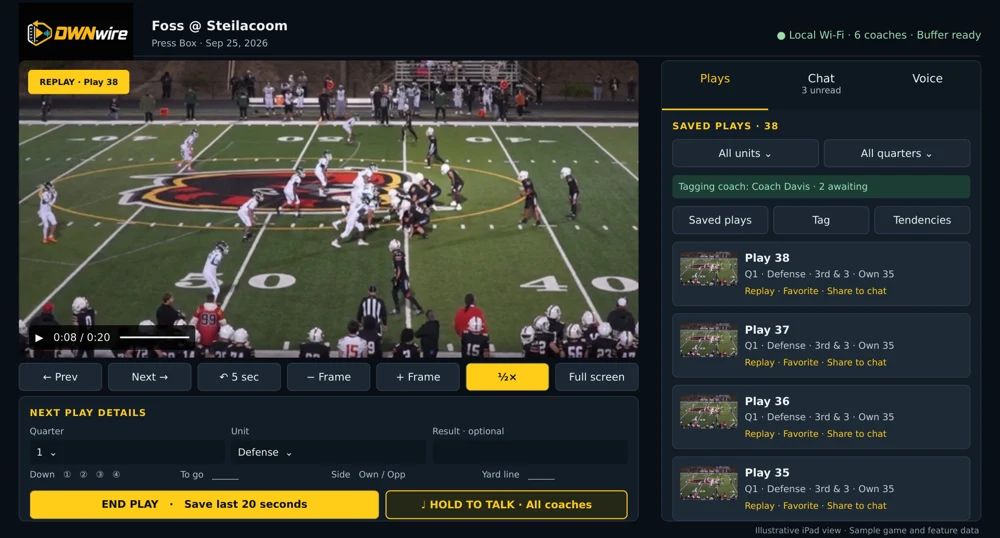
Existing illustrative operator interface with football video, saved plays and replay controls
Existing app illustration · sample game data
Game video Replay Staff chat Voice

APP TOUR

See both sides of the sideline.

One app, two roles. The operator hosts the game and captures the action. Coaches watch, review saved plays and keep the staff connected.

Illustrative operator workspace with sample football footage and saved plays

Operator illustration · sample game data · current device captures pending

Open full illustration ↗

OPERATOR WORKSPACE

Run the session from one workspace.

The operator hosts the local game session, captures silent camera video and keeps the replay buffer running. Save key plays, add game context and keep staff communication close to the action.

  • Start a game or resume a previous session.
  • Connect coaches using the current operator QR.
  • Keep the operator app open during the game.
Explore the operator workspace.
Ask about the app →

Illustrations show the Operator and Coach workflows with sample game data. Contact us to discuss the current beta and the right setup for your program.

FROM THE SIDELINE

Help shape the next play.

DWNwire Football is a functional product in invitation-only beta testing. Participating school programs are using the app and sharing feedback on game-day setup, replay and staff communication.

Testing with invited programs.

Already using DWNwire? Tell us what works, what slows your staff down and what you would improve.

Interested in participating? Tell us about your school and sideline setup. Beta access is by invitation; an inquiry does not grant access.

COMING SOON

Public release is on the horizon.

A public release date has not been announced. Contact DWNwire to discuss access and pricing for your school program.

HOW IT WORKS

From setup to the next play.

A local session built around your game-day routine.

01

Set up your session.

Use the same app version on every device. Join one local router network, start the operator session and connect coaches by QR.

02

Capture and review.

Wait for the replay buffer to fill, then tap End Play to save recent action. Revisit saved clips as the game continues.

03

Connect your staff.

Use staff chat and Hold to Talk. Assign a coach to tag plays when you want to review game-day tendencies.

BRING YOUR OWN GEAR

Plan your
sideline setup.

DWNwire Football uses iPhone and iPad devices connected to the same local router. Install the same version on the operator and every coach device.

Discuss your setup
Operator device

Start or resume the game on the camera device and keep DWNwire open. The operator hosts the local session.

Coach devices

Choose Coach in the installed app, enter your name and scan the current operator QR inside DWNwire.

Local network

Connect every device to the same non-guest router Wi-Fi and allow Local Network access. Game sessions are designed for local operation without internet.

Permissions & audio

Allow camera access for capture or QR scanning, microphone access for voice and Photos access for clip export. Native Coach voice does not use Safari certificate profiles.

FAQ

Frequently asked questions.

Invitation-only Football beta.

Can my school program use DWNwire now?

DWNwire Football is currently available to invited school programs through an invitation-only beta. Contact us to ask about participation and your program’s setup.

Does DWNwire need internet during a game?

Football iOS is designed to operate over a local router network without internet or a cloud voice server. Operator and coach devices join the same router Wi-Fi. Installation and updates are separate from game-day connectivity.

What devices does my program need?

The Football iOS app has Operator and Coach roles for iPhone and iPad. The app’s minimum OS target is iOS/iPadOS 16.0. Contact us to confirm a suitable device and network setup for your program; a minimum OS target does not guarantee suitability for every model.

How much recent action can I replay?

Choose a 20- or 30-second rolling buffer. Wait for Buffer ready before tapping End Play to save recent action. The buffer needs time to fill when capture starts or restarts.

Can I export saved plays?

Saved clips can be copied to Photos with permission. Game export provides individual MP4 clips in play order and a Play-details.csv file, with all, filtered or selected-play options. Automatic import of tagging data into Hudl is not verified.

How can beta programs share feedback?

Use the contact form and select Current beta feedback, or email hello@dwnwire.com. Include the app version, Operator or Coach role, device model and OS, what happened and what you expected. Please leave out identifying student information.

Setup guides and more answers →

LET’S TALK

Tell us about
your sideline.

Ask about beta participation, discuss pricing or share feedback from using DWNwire Football.

hello@dwnwire.com

DWNWIRE LLC · DuPont, Washington

We use these details to respond to your inquiry.