
The whole team.
One app.
Chats, schedule, attendance, buses and game day details for coaches, players and families, with the safety rules built in. Nobody messages a player privately.
Free for 14 days per team when it arrives · try the demo team right here
iPhone and iPad · Android and computers at teams.dwnwire.com · Free for 14 days per team
- Baseball
- Softball
- Basketball
- Football
- Flag Football
- Soccer
- Volleyball
- Wrestling
- Any other sport


Run the team right here.
You’re the head coach. Reach every player and parent, see who read it and who showed up, and plan the week. Real screens first, then try it.
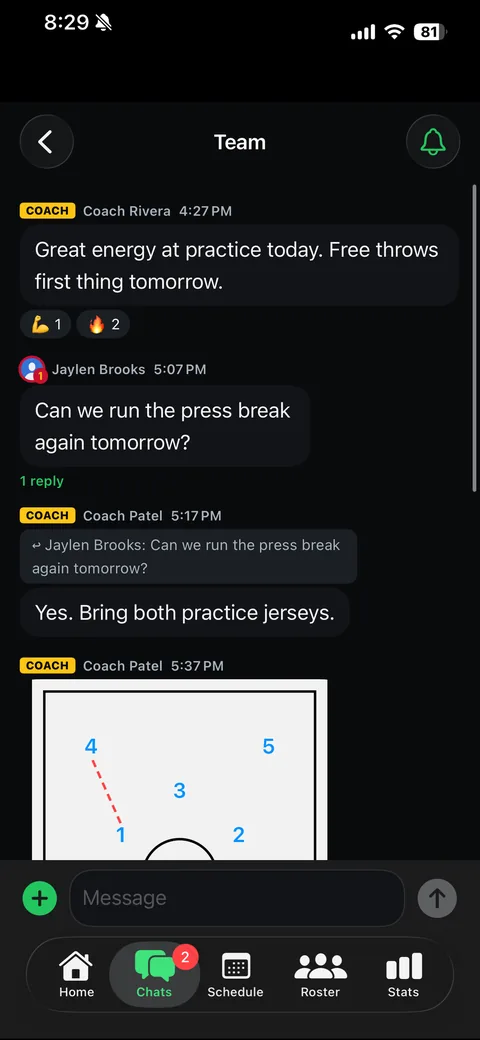

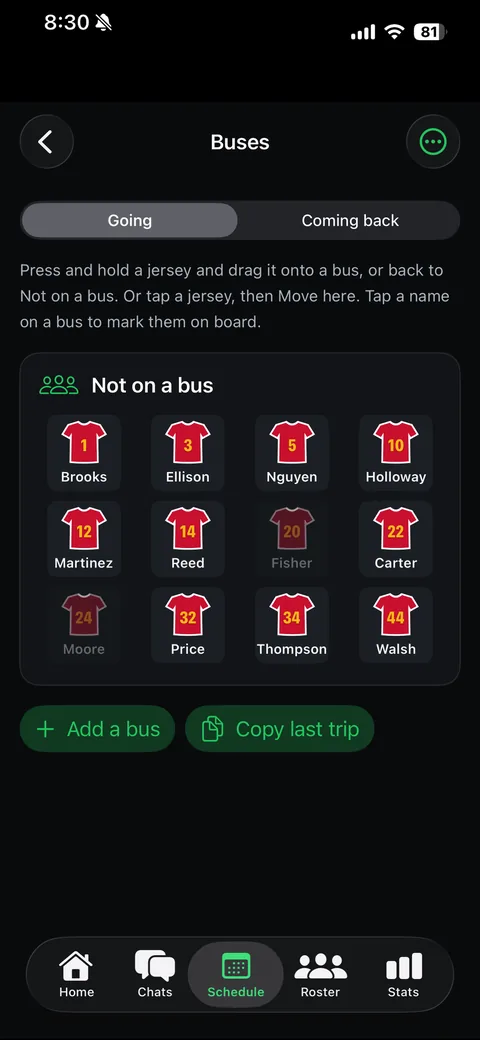
Screenshots from the app with the Steilacoom Sentinels, a sample team.
A sample team, the Steilacoom Sentinels. Nothing is saved or sent. The full demo team opens the real DW Teams website in a new tab.
Everything the program shares. Nothing it shouldn’t.
The rule of two, built in
No private messages, enforced on our server: no one-to-one chats, coaches and the AD read every chat, report and block, a word filter and quiet hours for players.
Chats for every group
Team, parents, coaches, captains, announcements and each level. Replies, photos, files, pins and “seen by”.
Schedule and RSVPs
Day, week and month views, repeating practices, the school calendar imported, and who hasn’t answered.
Game day card
Be there by, uniform, directions, your bus and when it’s back. Delayed or moved? One tap tells everyone. Live score for families at home.
Attendance and buses
Roll call in seconds or secure QR check-in. Drag jerseys onto buses and board by code.
Rosters and levels
Varsity, JV and C-Team in one program, with positions, eligibility and coach-only notes.
Practice plans, tasks, dues
Run a practice plan live, assign tasks and workouts, run sign-ups and carpools, and track dues.
Games from DW apps
After a game, tap Send to DW Teams in DWNwire Baseball & Softball, Basketball, Volleyball, Soccer or Wrestling: the score, each player’s stats and the box score. You check, then post.
Five minutes to start
Create the team, paste the roster, share the join QR. Families on Android or a computer use teams.dwnwire.com. Kids under 13 join only with a parent’s code.
Coaches and parents ask.
Do families need an iPhone?
No. Families on Android or a computer use teams.dwnwire.com, with the same chats, schedule, RSVPs and check-in. Add it to the home screen for notifications.
Can I try it before setting up a team?
Yes. Tap Try the demo team on the sign-in screen to see a sample program as a coach, player or parent. Nothing in the demo is sent anywhere.
How do players and parents join?
Share the team’s join code or QR. Players pick their name; parents pick their child. A coach approves each request. Staff join with a separate code.
Does it work with the DWNwire sport apps?
Yes. DWNwire Baseball & Softball, Basketball, Volleyball, Soccer and Wrestling already have Send to DW Teams: after a game, tap it and Teams shows the score, the players’ stats and the box score, and you post each one. Football, Flag Football and Stats get it with their App Store releases. You can also import stats from any DW app’s Excel export. If the sport app is on a school iPad, AirDrop the file to your phone. Teams sends your roster to a sport app in one tap. Teams coaches get the sport apps for $20 less, and coaches with a sport app plan will pay $39 a year for Teams once it’s on the App Store.
Get your whole team on one page.
Coming soon to the App Store, free for 14 days per team. Then $59 a year per team ($49 the first year), bought by the head coach; players, parents and assistant coaches never pay. If the plan ends, the team stays readable. Families on Android or a computer use teams.dwnwire.com.
Free for 14 days per team when it arrives · try the demo team right here
Open teams.dwnwire.com →Questions about Teams? Ask us or email hello@dwnwire.com. We read every message.
Page updated November 2026 · Equipment, connections & limits